Microsoft in Education Global Training Partner badge for 2026-2027 featuring a handshake icon over a globe and the Microsoft logo below.Purple shield-shaped badge with text 'Partner Success Series Education Solution Deployment and Management 2026 - 2027' above an icon of two hands shaking over a globe, and the Microsoft logo at the bottom.

Recognized by Microsoft in Education: Solution Deployment & Management partner and Global Training Partner

For K-12 school district leaders

Give teachers their
Friday evenings back.

Built inside the Microsoft 365 your district already runs.

Planning, paperwork and follow-up shouldn't eat the hours after the bell. WCT Education takes the repetitive work off your staff, under your district's own permissions, and educators stay in control of every decision.

A teacher leads a lesson at the front of a classroom while a student raises a hand
Field trip consent

Consent collected and tracked, automatically.

Signed
Family communication

Keep every family in the loop, without the extra work.

Follow-up reminders

The follow-up happens, even when you're busy teaching.

All in Microsoft 365

  • Outlook
  • Teams
  • SharePoint
  • OneDrive
  • Microsoft-Outlook
    Outlook
  • Microsoft-Teams
    Teams
  • Microsoft-SharePoint
    SharePoint
  • Microsoft-OneDrive
    OneDrive

Recognized by

Microsoft in Education Global Training Partner badge for 2026-2027 featuring a handshake icon over a globe and the Microsoft logo below.Purple shield-shaped badge with text 'Partner Success Series Education Solution Deployment and Management 2026 - 2027' above an icon of two hands shaking over a globe, and the Microsoft logo at the bottom.
Time back means something

Finish the work before the bell. Keep Friday evening for family.

28 min

to draft and review a special education plan that used to take an evening

94%

of families completed consent forms in a live district

640+

educator devices tracked every day

Recognized by

Badge showing Microsoft in Education Global Training Partner 2025-2026 with handshake icon and Microsoft logo.Purple shield-shaped badge with text 'Partner Success Series Education Solution Deployment and Management 2026 - 2027' above an icon of two hands shaking over a globe, and the Microsoft logo at the bottom.
28 min

to draft and review a special education plan that used to take an evening

94%

of families completed consent forms in a live district

640+

educator devices tracked every day

Recognized by

Badge showing Microsoft in Education Global Training Partner 2025-2026 with handshake icon and Microsoft logo.Purple shield-shaped badge with text 'Partner Success Series Education Solution Deployment and Management 2026 - 2027' above an icon of two hands shaking over a globe, and the Microsoft logo at the bottom.

Sound familiar?

The hours no budget line covers, done by the people you can’t afford to lose.

After the school day

Special education plans written after hours

Case managers assemble assessment findings, accommodations, goals and prior interventions from multiple sources before a plan can be reviewed.


Day 9 of chasing

The permission slip that never came back

Printed, sent home, lost in a backpack. The office phones families one by one. The field trip is Thursday.

Week 3 of parental leave

The laptop that went on leave

A teacher moves schools or goes on leave and the device goes too. Months later, nobody knows where it is.

Plan

After the school day

Special education plans written after hours

Case managers assemble assessment findings, accommodations, goals and prior interventions from multiple sources before a plan can be reviewed.

Permissions

day 9 of chasing

The permission slip that never came back

Printed, sent home, lost in a backpack. The office calls families one by one. The field trip is Thursday.

Devices

week 3 of parental leave

The device that lost its owner

A teacher moves schools or goes on leave, and the device leaves with them. Months later, nobody knows where it is.

Ai chat

Pilot in progress

Copilot questions, no district answer yet

Teachers are already asking. The board wants rules and a first use case before anyone turns it on.

Workflow

Administrative Workflows

The same handoff, every week

Records requests, coverage and reporting move by email and get chased by hand.

Governance

Microsoft 365 Governance

Nobody is sure the tenant is set up right

Settings have drifted, Microsoft updates went unread, and there’s no K-12 baseline to compare against.

left arrowRoght Arrow

Why time back matters

Administrative efficiency is not the finish line.

What matters is what educators do with the time they get back. They can plan stronger lessons, step in earlier when students struggle, and spend more of the school day with students.

A teacher high-fives a student during a small-group activity while classmates look on and smile
Time back, spent where it counts
  • More time for instruction

    Less drafting, searching, and chasing status updates.

  • Earlier student support

    Get the evidence, the plan, and the next step in front of the team sooner.

  • Stronger family connection

    Give teachers and the front office a simple way to follow up without another spreadsheet.

Here’s where that time comes from

What we build

What’s already running across school operations.

Three district workloads, now automated
‍
We map the work, build the solution inside your Microsoft 365, and hand it over to your team. Here’s how that played out in a real school district.
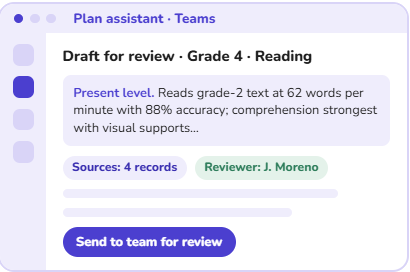
Special Ed Plan Draft

Plan assistant in Teams showing a Grade 4 reading plan draft ready to send to the team for review

Before: Case managers pieced plans together by hand from dense reports and old files.

What we delivered: An AI-powered plan assistant in Teams that drafts from the district’s own records. An educator reviews and signs off on every draft.

Production outcome: An evening of writing became 28 minutes of reviewing.

Part of Student Success & Support
Family forms parent view showing a field trip consent form signed on a phone in 90 seconds

Before: Paper forms went home in backpacks, and the office chased them by phone.

What we delivered: A family portal where families sign forms on their phones in their own language, reminders send themselves, and the office has one list of who is still missing.

Production outcome: 94% of families completed consent forms. Nine days of chasing became one afternoon.

Part of Connected Families
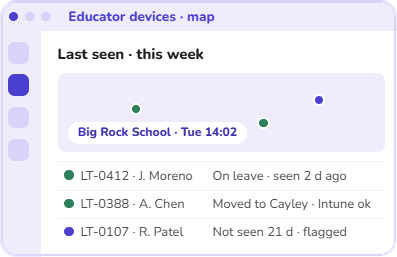
Device & Asset Ops

Educator devices map showing laptops last seen this week, with one device not seen in 21 days flagged

Before: IT kept a device spreadsheet and found out about lost laptops months later.

What we delivered: Every educator laptop on one map, showing where it was last seen, who last signed in, and whether Microsoft Intune still sees it. Alerts before a device goes missing, not after.

Production outcome: 640+ educator devices on the map every day.

Part of District IT Operations

Six ways to start

Education solutions that evolve with your district's needs.

Choose the solution that best fits your district’s priorities, and team capacity. Start with one, and add modules as your needs grow and the results prove out.

2 modules in this solution

Student Success & Support

Bring evidence, plans, and actions into a reviewable process while keeping educators in control.

See Special Education Planning above
  • Special Education Planning
    AI-assisted drafting of special education plans, documentation, and support workflows, with educator review, built in Microsoft Teams.
  • Student Support Plans
    A centralized workspace for student support plans and intervention tracking.

Start with one, add the next only after value is proven.

Learn MoreLearn More
Start with Student Success & Support

6 Modules in this Solution

Connected Families

Give families one secure route for messages, forms, payments and student-facing services.

See Forms & Consent above
  • Family Connect
    Problem
    Educators use disconnected channels, personal numbers and unverified family lists.
    Outcome
    Faster approved outreach, delivery history and less manual follow-up.
    How
    Educators work in Teams; guardian relationships and audiences are verified before send.
    Control
    District identity, approved templates, retention and audit history.
  • Forms & Consent
    Collect multilingual forms and consent with reminders, status and an audit trail.
  • Registration & Annual Verification
    Online enrollment for new students and annual updates for returning ones, with school office approval before records change.
  • School Payments
    Families pay online, schools see who has paid, and the business office gets records that match.
  • Attendance Intervention
    When a student keeps missing school, reach the family sooner and keep a record of every call, meeting, and follow-up.
  • Learning Portfolios
    Share consent-aware work samples and progress.

Start with one, add the next only after value is proven.

Learn More
Learn More
Start with Connected Families

3 Modules in this Solution

District IT Operations

From back to school to the last day of the year, keep track of every device, repair, and login in one place.

See Device & Asset Operations above
  • Device & Asset Operations
    Track devices, ownership, health and exceptions.
  • Substitute Class Access
    Give approved substitutes timely, controlled access.
  • Staff Onboarding & Offboarding
    Coordinate identity, access, devices and tasks across the staff lifecycle.

Start with one, add the next only after value is proven.

Learn More
Learn More
Start with District IT Operations

3 Modules in this Solution

AI for Educators & Leaders

AI help for educators and school leaders that follows your district's own permissions in Microsoft 365.

  • Educator Assistant
    Help educators draft, find, and organize routine work.
  • School Leader Assistant
    Support summaries, communications and follow-through.
  • Privacy & Compliance Assistant
    Support policy-aware drafting and route material questions to accountable reviewers.

Start with one, add the next only after value is proven.

Learn More
Learn More
Start with AI for Educators & Leaders

4 Modules in this Solution

District Workflow Automation

Short, fixed-scope projects for one district workflow at a time. We design and build the workflow. Your district owns it.

  • Records Requests
    Intake, route and track requests and deadlines.
  • Substitute Coverage
    Coordinate absence-to-coverage decisions.
  • Mandated Reporting
    The required steps happen automatically, so educators can focus on the student, not the paperwork.
  • Office & Finance Reporting
    Reduce recurring report preparation and approvals.

Start with one, add the next only after value is proven.

Learn More
Learn More
Start with District Workflow Automation

2 Modules in this Solution

Secure Digital District

Keep your district’s Microsoft 365 secure and aligned with Microsoft Education best practices. Know what to fix first, and catch changes that could put students at risk.

  • Blueprint 365 Assessment
    Problem
    Settings that drifted, Microsoft changes nobody read, and no K-12 baseline to compare against.
    Outcome
    A short list of what to fix, in order, with what each item costs.
    How
    Read-only Entra and Microsoft Graph assessment against an agreed K-12 blueprint.
    Control
    No student-data pipeline; district reviews every recommendation.
  • Blueprint 365 Assessment
    Blueprint 365 Assessment maps your district’s existing Microsoft 365 configuration against Microsoft Education best practices. You get a short, color-coded report that shows what to fix first and what to look at next.
  • Blueprint 365 Updates
    We compare your Microsoft 365 with your agreed K-12 blueprint every month and flag settings that changed.We also review Microsoft’s updates and highlight the ones that could affect students.

Start with one, add the next only after value is proven.

Learn More
Learn More
Start with Secure Digital District

2 modules in this solution

Student Success & Support

Bring evidence, plans, and actions into a reviewable process while keeping educators in control.

See Special Education Planning above
  • Special Education Planning
    AI-assisted drafting of special education plans, documentation, and support workflows, with educator review, built in Microsoft Teams.
  • Student Support Plans
    A centralized workspace for student support plans and intervention tracking.

Start with one, add the next only after value is proven.

Learn More
Start with Student Success & Support
Learn More

6 Modules in this Solution

Connected Families

Give families one secure route for messages, forms, payments and student-facing services.

See Forms & Consent above
  • Family Connect
    Problem
    Educators use disconnected channels, personal numbers and unverified family lists.
    Outcome
    Faster approved outreach, delivery history and less manual follow-up.
    How
    Educators work in Teams; guardian relationships and audiences are verified before send.
    Control
    District identity, approved templates, retention and audit history.
  • Forms & Consent
    Collect multilingual forms and consent with reminders, status and an audit trail.
  • Registration & Annual Verification
    Online enrollment for new students and annual updates for returning ones, with school office approval before records change.
  • School Payments
    Families pay online, schools see who has paid, and the business office gets records that match.
  • Attendance Intervention
    When a student keeps missing school, reach the family sooner and keep a record of every call, meeting, and follow-up.
  • Learning Portfolios
    Share consent-aware work samples and progress.

Start with one, add the next only after value is proven.

Learn More
Start with Connected Families
Learn More

3 Modules in this Solution

District IT Operations

From back to school to the last day of the year, keep track of every device, repair, and login in one place.

See Device & Asset Operations above
  • Device & Asset Operations
    Track devices, ownership, health and exceptions.
  • Substitute Class Access
    Give approved substitutes timely, controlled access.
  • Staff Onboarding & Offboarding
    Coordinate identity, access, devices and tasks across the staff lifecycle.

Start with one, add the next only after value is proven.

Learn More
Learn More
Start with District IT Operations

3 Modules in this Solution

AI for Educators & Leaders

AI help for educators and school leaders that follows your district's own permissions in Microsoft 365.

  • Educator Assistant
    Help educators draft, find, and organize routine work.
  • School Leader Assistant
    Support summaries, communications and follow-through.
  • Privacy & Compliance Assistant
    Support policy-aware drafting and route material questions to accountable reviewers.

Start with one, add the next only after value is proven.

Learn More
Learn More
Start with AI for Educators & Leaders

4 Modules in this Solution

District Workflow Automation

Short, fixed-scope projects for one district workflow at a time. We design and build the workflow. Your district owns it.

  • Records Requests
    Intake, route and track requests and deadlines.
  • Substitute Coverage
    Coordinate absence-to-coverage decisions.
  • Mandated Reporting
    The required steps happen automatically, so educators can focus on the student, not the paperwork.
  • Office & Finance Reporting
    Reduce recurring report preparation and approvals.

Start with one, add the next only after value is proven.

Learn More
Learn More
Start with District Workflow Automation

2 Modules in this Solution

Secure Digital District

Keep your district’s Microsoft 365 secure and aligned with Microsoft Education best practices. Know what to fix first, and catch changes that could put students at risk.

  • Blueprint 365 Assessment
    Problem
    Settings that drifted, Microsoft changes nobody read, and no K-12 baseline to compare against.
    Outcome
    A short list of what to fix, in order, with what each item costs.
    How
    Read-only Entra and Microsoft Graph assessment against an agreed K-12 blueprint.
    Control
    No student-data pipeline; district reviews every recommendation.
  • Blueprint 365 Assessment
    Blueprint 365 Assessment maps your district’s existing Microsoft 365 configuration against Microsoft Education best practices. You get a short, color-coded report that shows what to fix first and what to look at next.
  • Blueprint 365 Updates
    We compare your Microsoft 365 with your agreed K-12 blueprint every month and flag settings that changed.We also review Microsoft’s updates and highlight the ones that could affect students.

Start with one, add the next only after value is proven.

Learn More
Learn More
Start with Secure Digital District

One Microsoft foundation

  • Abstract geometric logo with interlocking shapes forming a continuous loop in blue and purple gradient colors.Microsoft 365
  • Microsoft Teams logo with stylized letter T on a purple background and two abstract person shapes beside it.Teams
  • Microsoft SharePoint logo with overlapping teal and blue shapes, featuring a white 'S' on a square teal background.SharePoint
  • Abstract blue geometric shape composed of overlapping facets resembling a stylized letter G or paper folded into a diamond-like form.Entra ID
  • Abstract blue wave-like shape with gradients forming a continuous ribbon.Intune
  • Stylized letter P logo composed of gradient shades of green and blue with a modern and sleek design.Power Platform
  • Abstract blue gradient symbol composed of overlapping rounded shapes, resembling stacked or connected 3D blocks.Copilot Studio
  • Azure
Brick school buildings with spring blossoms reflected in a still pool

Your workflows. Your policies. Your Microsoft environment.

Doesn’t fit one of the six?

Your district may not fit a template. It should not have to.

Start with our Solutions, or bring us a workflow they don't cover. We build it around your policies, systems, and school calendar, and your district owns the result.

  1. 1

    Start from the real workflow

    People, policy, systems, exceptions, academic timing, and success measures.

  2. 2

    Reuse the strongest foundation

    Identity, portals, assistants, and device data that already work in your environment.

  3. 3

    Deliver something the district can own

    Documented apps, and flows, with the rules and the owners written down.

How it works

How an engagement runs, start to finish.

  1. Stage 01:Listen

    Map the work

    We work alongside your district to understand one recurring workflow, including who’s involved, which policies and systems apply, and what happens when things don’t go as planned.

  2. Stage 02:Prove

    Build the flow

    Build a small pilot inside your Microsoft 365, with real cases and real limits.

  3. Stage 03:Launch

    Go live with owners

    We train your team to run the workflow and agree together on how success will be measured.

  4. Stage 04:Choose

    Choose next steps

    Once the first workflow is trusted, we decide together whether to extend it, add the next one, or run it on your own.

Who we help

Built for the teams that keep districts moving.

Every engagement starts with one team and one burden. Find yours to see where it usually begins.

  • Educators & Learning

    Teachers, curriculum leaders and coaches get time back for planning, feedback and teaching.

  • Principals & School Leaders

    Move communication, approvals and follow-through out of inboxes and into visible workflows.

  • Student Services

    Special education and support teams coordinate plans without giving up professional judgment.

  • Technology & Trust

    Directors of technology and IT directors keep the foundation secure without becoming the bottleneck.

  • Records & Family Operations

    Families sign forms from their phone, and educators see every response in one place.

  • Finance, HR & Administration

    Take the recurring handoffs out of onboarding, coverage, reporting and reconciliation.

Why districts trust WCT education

A team that has sat on every side of the table.

WCT Education is the education practice of WaferWire Cloud Technologies, a Microsoft partner.

We build with educators and leaders, not for them. We also stay after launch. Support and upkeep are part of the work, so what we build keeps working when the people change.

  • In the district’s IT office

    We’ve worked with district IT offices, so we know your day from the inside. The requests that never stop, the teachers waiting for an answer, the feeling of always being a step behind. We see the problem the way you do.

  • As the Microsoft partner

    Our team has helped more than 100 school districts with Microsoft 365 Education, including strategy, rollout, adoption, security, and governance. We know what breaks between the demo and the first day of school.

  • Built at education scale

    Years spent supporting Microsoft Teams for Education at the scale of 100 million monthly users. That experience is on every WCT project.

  • Support through back-to-school

    Support specialists in the US and India for districts that want them, staffed up for back-to-school and the other weeks when everything happens at once.

A team of 50+

We work on Microsoft Education solutions every day, solving the problems schools actually run into.

Since 2010

Building and running Microsoft technology for enterprises and the public sector, from the US, India, Mexico, the UK and Australia.

Microsoft-recognized

Microsoft in Education Global Training Partner 2025–2026 badgeMicrosoft Partner Success Series: Education Solution Deployment and Management 2026–2027 badge
Magnus Sandtorv

Who you will meet first

Magnus Sandtorv

Your first conversation is with someone who has worked in district IT, at Microsoft partners and inside Microsoft Education Engineering. Behind him is the team that builds, delivers and supports the modules.

Microsoft Most Valuable Professional (MVP) Reconnect badge

In their words

What districts say once the work is live.

What stands out about WCT Education is their ability to understand our unique needs and deliver solutions that work within the tools we already use. Keeping our data within our existing environment while making better use of our current ecosystem is especially valuable. The opportunity to replace costly third-party platforms with solutions that fit our needs makes a real difference for school districts like ours.
Sally SmithSally SmithDirector of Organizational Transformation and Technology
Foothills School Division

The work behind this experience

Runs in your tenant

You keep the keys. And the apps.

District data stays under district control, every important decision stays with a person, and the operating model is agreed before work starts.

Your Microsoft tenantDistrict-owned boundary. WCT Education builds inside it: you hold every key.

Identities & data

Your tenant, your identities

What we build runs under your permissions, sensitivity labels and retention policies. Your data is not used to train models. The Microsoft agreement you already signed is the agreement that covers what we build, because it runs as yours, in your tenant.

Ownership

Ownership from day one

Apps, flows and agents are deployed in your tenant. Ownership, documentation and exit terms are written into the proposal.

Governance

A person still decides

AI can assemble and recommend. Dedicated staff review and approve actions before they become records or decisions.

No lock-in

Free to run it without us

Runs inside your district’s Microsoft 365, under your own permissions. Mostly uses licenses you already have, and your district owns the result.

Built on the Microsoft platform you already own

  • Abstract geometric logo with interlocking shapes forming a continuous loop in blue and purple gradient colors.Microsoft 365
  • Microsoft Teams logo with stylized letter T on a purple background and two abstract person shapes beside it.Teams
  • Stylized letter P logo composed of gradient shades of green and blue with a modern and sleek design.Power Platform
  • Abstract blue gradient symbol composed of overlapping rounded shapes, resembling stacked or connected 3D blocks.Copilot Studio
  • Stylized green overlapping circular shapes forming an abstract design.Dataverse
  • Icon with three overlapping tilted squares in shades of purple, arranged diagonally from top left to bottom right.Power Pages
  • Abstract blue wave-like shape with gradients forming a continuous ribbon.Intune
  • Azure

Start here

Your Journey Starts Here

You don’t need to know the answer. You just need to know where you’d like to start.

Step 1 of 3 · Choose a starting point

Which sounds most like you right now?

Choose the closest fit. There is no wrong answer, and you can change it later.

I want to reduce administrative workload
Find the hours lost to paperwork and remove the first one.
I need families to actually answer
Consent, messages and follow-up families actually complete.
I want to explore AI assistants
Help for teachers and leaders, grounded only in what your district has approved.
I need help with governance and planning
What to fix first in Microsoft 365, and what to fund next.
I have a district-specific workflow challenge
Something none of the six covers, built to fit how you work.
I’m not sure where to start
Talk it through with an education lead and find it together.

Your starting point

I want to reduce administrative workload

We start with a read-only look at where administrative hours go in your Microsoft environment, then name the first workflow to remove.

Change

Who should we reach?

A member of our team will be in touch shortly.

We use your details only to reply to this request.

Thank you for your enquiry.

An education lead from WCT will contact you to understand your needs and discuss a practical next step.

Start another enquiry
Your enquiry could not be sent. Please try again. Your details are still here.